Python for DevOps
From Syntax Refresher to My First FastAPI Endpoint
Why The Refresher
I'm trying to bridge a gap in my Python knowledge as I pursue automations and a DevOps job. Refreshing the fundamentals now will solidify what I know, so I'm working through a course that starts with the basics and builds up to APIs and AI agents. The course instructor uses VS Code, I'm sticking with vim. This is also directly useful prep for an upcoming hackathon; RowdyHacks.
Study Sesh One - Fundamentals, Conditionals, and Venv
Breezed through the refresher on variables, data types, and data structures, nothing new, just knocking the dust off.
The example that actually made it click for DevOps work was a simple conditional exercise:
"As a devops engineer you need to check if CPU % is greater than 50%; if CPU is greater than 20% but less than 50%, alert the team."
Code for this lives in cpu_check.py and real_cpu_check in the repo.
Also spent time on virtual environments, since managing packages and dependencies across different Python projects gets messy fast. Instead of installing different versions and conflicting binaries globally, you spin up a venv and install dependencies inside it, keeping everything tidy and decoupled:
python -m venv .venv
source .venv/bin/activate
Using pip for now. Once I move to uv, I won't even need these commands since uv handles venvs natively.
Study Sesh Two - Functions, Loops, and an Actual CPU Check
This session was functions and loops, then putting them to use on a real exercise:
As a DevOps Engineer, check the CPU usage for 5 seconds, take a threshold from the user, and check if CPU is healthy.
This is also where the psutil library came in, which is useful for interacting with local process and system info. I found myself reading a lot of documentation which is a skill in, and of itself.
Study Sesh Three - Reviewing My Own Code
Went back and reviewed how I'd answered the previous session's exercise. My solution and the instructor's were different but landed on the same result, and honestly, mine was a little better. Getting noticeably more comfortable with the logic, syntax, and flow control at this point, and it works. All of it is sitting in commit history in my public lab repo.
Study Sesh Four - Making Code Reusable, and What an API Actually Is
Took the code from the last session and made it reusable, then moved into APIs: what they are, why they exist, when to use them, and how to build one in Python.
The instructor uses the request library for GET, PUT, DELETE, and so on. The metaphor that made APIs finally click for me was, thinking of an API as the middleman between a client and a server, like at a restaurant. You don't walk into the kitchen and order directly from the chef/back-of-house. You look at the menu, the waiter takes your order to the chef, and the waiter brings the food back out to you. The API in that scenario is the waiter, back-of-house/chef would be your "Backend", and the menu or front-of-house would be your "Frontend"
This is also where FastAPI is introduced in the course; a framework for building APIs from scratch. I kinda went of the deep end and started having a lot of fun with FastAPI. Their docs were very useful and I was up and running in no time..
Install:
pip install fastapi "fastapi[standard]"
FastAPI itself is a class (from fastapi import FastAPI), and the appeal is how "Fast" it is to something useful e.g. you define your parameters using standard Python types, and FastAPI takes care of the rest. Including generating two versions of automatic docs for your API without being asked. Feels a little spoiled, if im being honest but I'm not going to complain.
Study Sesh Five - Building the Hello World and Metrics Endpoints
Time to combine the FastAPI basics with the system-check code from session three into a real endpoint, /metrics, that reports actual system info by calling a check_system_info function.
Sounded simple. Spent 20 minutes troubleshooting and couldn't get it working, so I watched how the instructor approached it instead. My attempt:
from fastapi import FastAPI
from system_utils import check_system_info

app = FastAPI(title="Devops Utils API")

@app.get("/hello")
def hello():
    return {"message": "Hello Angel, Welcome To Devops Utils API"}

@app.get("/metrics")
def metrics():
    system_metrics = check_system_info()
    return {"system metrics": system_metrics}
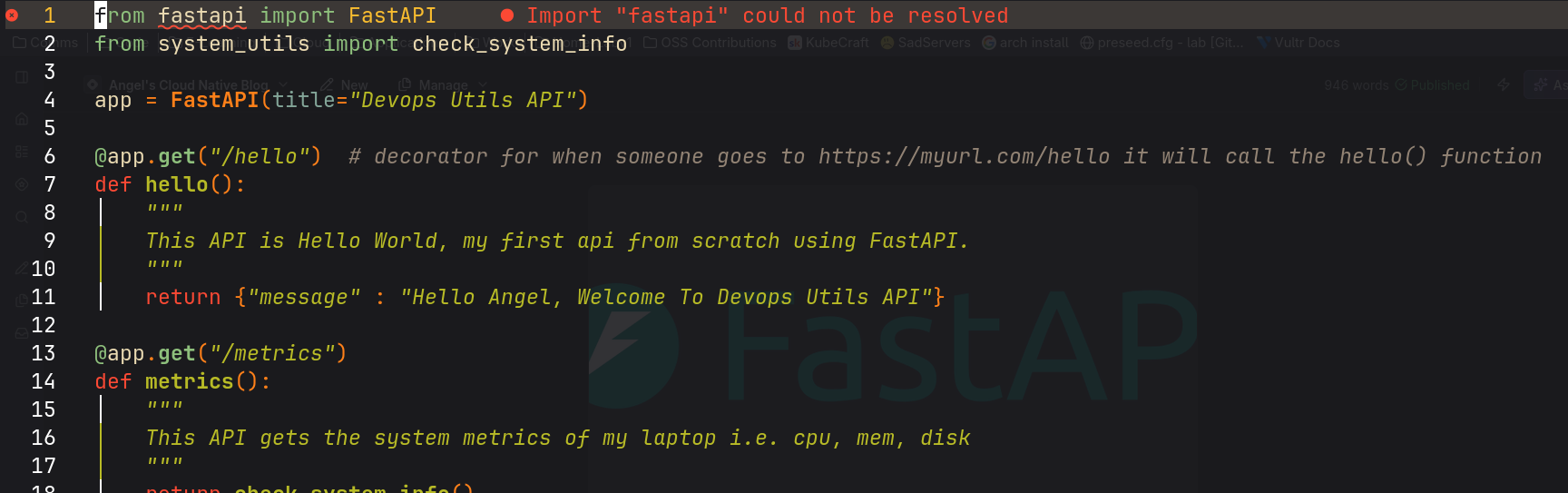
Turns out I was overthinking it. The fix was just calling the function directly and letting FastAPI handle the rest:
from fastapi import FastAPI
from system_utils import check_system_info

app = FastAPI(title="Devops Utils API")

@app.get("/hello")
def hello():
    """
    This API is Hello World, my first api from scratch using FastAPI.
    """
    return {"message": "Hello Angel, Welcome To Devops Utils API"}

@app.get("/metrics")
def metrics():
    """
    This API gets the system metrics of my laptop i.e. cpu, mem, disk
    """
    return check_system_info()
Where I'm At
I feel a lot more confident on how to build my own APIs from scratch with FastAPI, understand how they work, and know what purpose they serve. Both the hello-world endpoint and the metrics endpoint locked it in for me.
All the exercises from these sessions are in my GitHub lab repo, for anyone who wants to follow along or check my work.
Whats Next
Building my own API to interact with the Docker daemon, from scratch, no course this time. That one's going to be its own write-up.
More to come; until next time see ya on the flippity flip.